The Journey from Traditional Networking to Cloud Networking (Azure)

I’ve spent a lot of years doing “traditional” networking. ASIC-based switches, hand-built BGP adjacencies, both sides of every connection configured and verified before I’d trust it. So when I recently went deep into deploying Cisco FTDv firewalls as Network Virtual Appliances (NVAs) into an Azure Virtual WAN vHub, I expected the usual: configure my side, configure Azure’s side, watch the neighbour come up.

That’s not what happened. And that gap between what I expected and what actually happens is, I think, the single most important thing to explain to any network person making this jump. So that’s where I’m going to start.

Azure Doesn’t Want You to Touch It, and That Feels Like a Trust Issue

Here’s the thing that will throw you off if you’ve done “real” networking for a while: in Azure Virtual WAN, you don’t configure the other side of the BGP relationship.

Enable Routing Intent on the Azure Portal, and Azure will start BGP peering with your NVA. You will never see a BGP neighbour listed in the portal for it. Not because something’s broken — because Azure never asked you to configure one. The Azure vHub router’s ASN isn’t something you set either; it’s Azure system-assigned the moment the hub gets created. Make sure you’re aware of these Azure ASN reservations so you don’t accidently use them (internet search “azure reserved asn numbers”).

With Routing Intent, there are no Azure route tables to babysit either. Routing Intent is a one and done affair.

If you’re coming from traditional networking, this is going to feel like a trust issue. You’re used to being able to see both sides of an adjacency. In Azure, half of it is invisible to you by design. My advice: don’t fight it. Follow the vendor’s Azure-specific onboarding document (in my case, Cisco’s FTDv guide) to the letter, and stay away from general Azure BGP documentation while you’re doing it. The general docs describe a different mental model and will just confuse you mid-deployment.

The IP Address That Isn’t “For Example”

Buried in the Cisco documentation is a line that says “For example: 168.63.129.16.” I want to flag this specifically because I think it’s a trap.

168.63.129.16 is not an example. Type that exact address. It’s Azure’s “magic” virtual IP — a fixed address, consistent in every single Azure region, that serves as the dedicated endpoint for DNS, DHCP, and health probes. If you read past that line assuming it’s a placeholder like most documentation examples are, your health probe will never work, and neither will your BGP pairing, because Azure won’t consider your NVA operational until that probe succeeds.

A few more things in this same neighbourhood that got flagged as “explain this clearly or someone will burn a day on it”:

  • The internal load balancer’s health probe needs a static route configured on the NVA side, and the FTDv’s HTTP server needs to be enabled with an ACL letting that probe through on the internal interface.
  • Your static routes to the Azure vHub gateway need to stay at metric 1. The NVA isn’t directly connected to the vHub router, so it has to reach it via static route — and if that route’s metric is higher than BGP’s default of 20, you’ll get route flapping.
  • Under BGP advanced settings, check the box for “Disable Connection Verification.” Azure needs it checked.
  • You do not need a user-defined route (a UDR, in Azure-speak) on the vHub side. If you’re hunting for where to add one, stop — there isn’t one. Again, Azure Routing Intent is one-and-done, there is nothing to do on the Azure side of things. Likely the issue is on the NVA side so go back to the vendor NVA documentation and triple check everything.

Sizing Your Hub: The Decision You Don’t Get a Second Chance At

This next part isn’t a “gotcha,” it’s just math that’s easy to skip past during initial design and painful to discover later. Making this error means standing up a new Data Centre or having multiple Data Centres. The networking world is working on 10-20 year cycles, not the faster server world cycles of 5-10 years. We want to make design decisions that last.

Every Azure Virtual WAN hub reserves a fixed pool of IP addresses for NVA subnets, and that pool size is locked in by the hub’s address space when it’s created. It doesn’t matter whether you’re using the capacity or not — it’s static, and changing it later means rebuilding.

Here’s how the address space choice plays out:

vWAN Hub Address Space (for NVA vNet allocation)IPs per NVA subnetMax Scale units per NVA as dictated by Vendor (example Cisco with Cisco’s max throughput figures)Max vHub theoretical limit with all 16 NVAs deployed
/23 or smaller1140288 Gbps
/222780480 Gbps
/215980480 Gbps
/20 or larger12380480 Gbps

Pick a /23, and you’re capped at 288 Gbps hub-wide and 40 scale units per NVA. Go to /22 or bigger and both numbers jump — 480 Gbps and 80 scale units. My recommendation is at least a /22. Honestly, since most organizations aren’t using this private address space for anything else, I’d go as far as suggesting a /20 just to future-proof against whatever Azure changes down the road. It costs you nothing today. The maximum number of NVAs per hub is always 16, regardless of size — so this decision is really about how big each of those 16 can eventually get (Azure scaling with additional VMs), not how many you can deploy.

Flow Limits: The Outage Nobody Notices Coming

If you only budget for bandwidth, you’re going to get burned by this one.

Every VM, and therefore every NVA, has a maximum bidirectional flow limit — and for an NVA it is half of what the underlying VM’s rated connection capacity is — and this is a hard spike ceiling, not a long-term average. Blow past it, and connections get dropped. Not politely refused. Just dropped. The client machine keeps retrying a TCP handshake that will never finish, and to the end user, it looks like the app is frozen or spinning forever, with zero indication of why.

This always matters but it matters more if your NVA is doing double duty. An NVA handling both north/south and east/west traffic — which is a pretty normal pattern for an Azure landing zone — is eating into its flow budget from two directions at once, and needs to be sized accordingly from day one, not after the help desk tickets start rolling in. Be mindful of where the backups are going, that’s going to be the big flow generator if it goes via the firewall.

Should You Cluster the FTDvs? My Answer: Probably Not

Azure High Availability is not supported with clustering. That one line should stop you before you get excited about clustering as the “enterprise” answer. In Azure, the only reason to cluster is to auto scale and that introduces complexity most enterprise organizations don’t need.

Without clustering, Azure’s built-in internal load balancer already does most of what you’d want:

  • Traffic is already load balanced to all the VM FTDv instances in the NVA by default.
  • Want to pull a VM FTDv in the NVA out of service? Remove its health probe static route. Done — traffic stops immediately.
  • Scale up and add a new VM FTDv instance? It comes up without an active health probe route, so it stays silent until you deliberately turn it on.

That’s a manual process, sure. But it’s predictable and low-drama, and it doesn’t drag in the cost and operational overhead of a full autoscaling pipeline — which for FTDv means standing up Azure Function Apps and Logic Apps and a whole different deployment process. For a shop that isn’t building toward serious autoscaling, that complexity isn’t buying you much.

Clustering on in Azure with Cisco FTDv also comes with a list of unsupported features so always be careful to read the caveats before implementing . What might not be supported? This is the list for Cisco: remote access VPN (SSL VPN and IPsec VPN, site-to-site VPN, Virtual Tunnel Interfaces (VTIs), High Availability, Integrated Routing and Bridging, to name a few — plus real operational care and feeding: disabling health checks around any topology change, never pulling more than one node out of a scale set at a time, disabling clustering on a node before removing it. None of that is a dealbreaker if you need clustering. It’s just a cost you should go in knowing about.

My take: clustering earns its complexity when you’re actually building toward autoscaling. If you’re not there yet, the built-in load balancer and manual scaling gets you the same outcome with a lot less to manage.

Where This Leaves You

If there’s one idea I want a traditional networking person to walk away with, it’s this: Azure Virtual WAN isn’t hiding half the configuration from you out of carelessness. It already did that half of the work before you logged in. The ASN you never set, the BGP neighbour you’ll never see in the portal, the route table you configure once and never touch again — none of it is missing. It’s just handled.

The engineers who get comfortable with this fastest are the ones who stop hunting for the configuration step that isn’t there, and start trusting the health probes and Routing Intent to do the job that “both sides configured” used to do by hand.

About the Author

Trevor Textor specializes in solving problems that have organizations stuck. That means he does pretty broad things from A-Z and somewhere in there yes, he helps out with networking. Sharing what he learns the hard way is a hallmark of Trevor’s work. Ask Trevor if he can help: anyskill.ca/afc-capability-matrix.

Networking Via Virtual Conferences

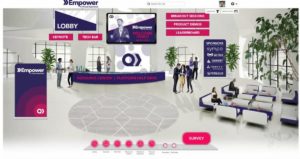
Virtual Conference Lobby

Networking has traditionally been something that needs to be done on the ground. Coronavirus (COVID-19) has thrown a wrench into all that among other things. Like me, you’re probably wondering what it’s like to do networking via virtual conferences?

Background

As a freelancer I get most of my business from networking at conferences. Therefore, I am motivated on a survival level to see if the value of conference networking can be recreated virtually.

My first successful virtual networking experience was via QuickBase’s 2020 Empower Conference. I was specifically looking to experience the networking component as I’ve attended virtual networking in prior conferences and it was a failure. In those instances, the software was not ready for virtual conferences.

Networking Via Virtual Conferences – How It Worked

QuickBase utilized the 6Connex Virtual Event Software. Networking was via Breakout sessions. The participant was given a list of networking subjects to choose from. QuickBase is a low-code platform marketing to the economy as a whole. Subjects included: “manufacturing”, “small business”, “not-for-profit”, etc.

After selecting the subject, the participant was then asked to register their name and email address for a Zoom meeting. Once this was done, the participant was given a Zoom meeting URL. When fully connected to Zoom, the participant briefly met with the conference organizer panel that was assigned to that subject. The panel then randomly assigned the subject to a micro-breakout session of 4-6 people.

The micro-breakout networking ended abruptly at the allocated time. If anybody was mid-sentence they were cutoff. The panel organizers followed the micro-breakout by addressing everybody in the larger audience (~45 people) as a wrap-up and terminated the session.

I arrived late, due to work commitments, so presumably the panel organizers prefaced the subject before assigning people to micro-breakouts.

Lessons Learned

  1. Prepare your workspace for remote working. I wrote a tips article on this subject: https://www.textor.ca/preparing-for-remote-working/
  2. If you know before-hand what the conference is using for video conference software, try to pre-install it. Zoom is very popular though, I suggest having it pre-installed either way: https://zoom.us/download
  3. Test audio and video prior to joining if possible or given the opportunity to do so.
  4. Be ready to video conference.
    • Wear clothes as if you were going into an office.
    • Make sure the background behind you is tidy.
    • Avoid use of virtual backgrounds. In my experience as a public speaker and having been given feedback, they are distracting as they do not work that well. This experience has been consistent over many types of webcams and video conference platforms.
    • Enabling video adds to your perceived level of professionalism. Many folks may not enable their video and that’s ok. But if you want to display professionalism, start with your video on when networking via virtual conferences.
  5. Be familiar with how to mute and unmute. It’s best practice to mute when you are not talking and unmute when talking. I can’t stress this enough and if you only make one thing a habit when working remotely it is this.
  6. Be prepared to take notes. This helps you follow the conversation and ask interesting questions during the networking session. This is something we may not have the opportunity to do in real life, so take advantage of it. I’ve used this technique when publicly speaking on panels and it has noticeably improved my performance over those panelist who do not do this.
  7. Write all the people’s names down in order to follow-up via chat post-call if necessary. The conference usually has a directory so you may be able to track them down to follow-up on conversation items and/or exchange business cards (virtually of course).
  8. Keep to the schedule. Look for an opportunity to ask if there is an interest in swapping contact info. Leave this no later than 5-7 minutes before the scheduled end if possible.

Conclusion

Honestly, the hard stop was frustrating but I can see the value of having this power to “pull the plug” from a conference organizer’s perspective. Clearly, it will take some getting used to networking via virtual conferences. But I see that it can be effective.

I’d like to hear from other’s experiences. What do you think?

About the Author

An avid writer, Trevor Textor has been quoted by Reader’s Digest, NBC News, Reviews.com and MarketWatch.com among others. As a freelancer Trevor has a “swiss army skillset” and has proven able to successfully assist many small, medium and large businesses in most areas of their business. Ask Trevor if he can help: https://www.textor.ca/contactme/.

“The Internet” – UofC Alumni Online Speaking Engagement – May 7, 2020 – All Welcome

I am honored to be speaking to my University of Calgary Alumni association, Computer Science Chapter, on May 7, 2020 from 5:30-6:30pm. Everyone is welcome.

Topic

The Internet. Big, bold, confusing and, most now say, critical.

Trevor Textor has journeyed through the world of “the network” for nearly 20 years. In this presentation he’ll be looking at the Internet from the lens of a rural municipality that had to build their own network just to get the vendor to provide service to their residents. Together we’ll explore the Internet’s many facets and hopefully dispense with a few myths.

Registration

If interested in attending please register here: https://netcommunity.ucalgary.ca/CPSCAlumniLecture_May2020

Update (May 10, 2020): Video recording is located here:  https://www.youtube.com/watch?v=rz0_oj5Balk

Massive Upgrade to Canadians’ Internet Security – CIRA Canadian Shield

Canadians’ Internet Security Gets Leveled Up

“Built by Canadians for Canadians” CIRA’s Canadian Shield effort is a massive enterprise-grade security upgrade for all Canadians’ Internet Security that adds another layer to our collective tool-kit. Implemented with help from the Canadian Security Establishment (CSE), the initial “go live” was 23Apr2020 and presumably this roll-out was fast-tracked due to #Coronavirus #COVID19 elevated threat levels.

How to Turn It On

To enable, users will need to manually update their systems to get the benefit. As explained here, for every system but mobile (explained below), users just need to update their home router DNS settings. This means that users will not have to install and maintain software to get the security benefit.

Note: Some users may have to additionally modify computer DNS settings if they use a manual IP (advanced).

How Canadian Shield Works

Canadian Centre for Cyber Security (CSE) has a nice diagram that shows how it uses DNS to protect users from malicious content.

What is DNS? It’s the thing that translates human readable URLs like “Textor.ca” to an internet protocol (IP) “64.90.34.49”. You can read more about what DNS is here.

Canadian Shield has three levels of service based on the level of protection the user chooses.  The level of protection is determined by which IP addresses the user chooses to configure their DNS with. The three levels are:

  1. Private: DNS resolution service that keeps your DNS data private from third-parties.
  2. Protected: Includes Private features and adds malware and phishing blocking.
  3. Family: Includes Protected and Private features and blocks pornographic content.

Benefits

What I like about Canadians’ Internet Security newest addition is that it’s a non-ISP based Canadian DNS service. Currently the DNS servers are located in Montreal, Toronto and Vancouver and Alberta may need to route via Seattle to get to these services. This makes me skeptical that it will remain fast so I’ll keep this entry posted with updates. The devil is in the details.

OpenMedia.org believes the service is better because “…Canadian Shield … is entirely hosted in Canada, so unlike most free and paid alternatives your Internet data will not travel internationally and become subject to foreign surveillance practices. We also appreciate CIRA’s promise that any information related to your Internet activity is deleted after 24 hours, in contrast to many home ISPs who otherwise handle our web traffic which retain that data longer, or may not guarantee to delete it at all.”

Mobile Users

At home, mobile users will pickup DNS settings from their home router. The challenge is when they are away from home.

For mobile users away from home, my understanding from reddit.com is that users install a CIRA app that enables a VPN. This may be fine for light users but likely will create a bit of havoc for advanced users and their configurations. A reddit users says “Tested the VPN app (iOS) today. First thing I always check is performance. Downstream speed took a hit, upstream was 10% of normal. I’ll skip it for now.” On the Google Play store app a user’s feedback is that it “Blocked access to safe programs” and CIRA asked the user to follow-up by emailing them at CanadianShield@cira.ca.

I’m recommending all users avoid the mobile software for a couple of months to let users that are ok with beta testing work out the bugs.

Update June 17, 2020

Back on April 27, 2020 I implemented the DNS changes to my household router and two workstations that have static IP setups. So far, no issues; as expected.

About the Author

An avid writer, Trevor Textor has been quoted by Reader’s Digest, NBC News, Reviews.com and MarketWatch.com among others. As a freelancer Trevor has a “swiss army skillset” and has proven able to successfully assist many small, medium and large businesses in most areas of their business. Ask Trevor if he can help: https://www.textor.ca/contactme/.

Work from Home Burnout #Coronavirus #COVID19

As everyone rushes to working remotely, which encompasses work from home, it’s good to see recognition that burnout can still happen in this environment:

Global News Article: “Burnout is real — even when working from home”

In the article the advice is “Do not expect employees to be as productive”; but I’m not sure that’s the right statement. I think staff can be more productive in the hours they work, but do not expect them to work a contiguous 8-hour day as if they were in the office. During Coronavirus, the pressures of family life are more acute than ever. Specifically: caring for young kids, caring for seniors or both if you’re unlucky enough to be part of the sandwich generation (like we’ve been).

Why I became a Freelancer Project Manager

Myself, I became a freelancer because the freelance arrangement is focused on productivity, not the office hours you keep (see article “When Your Employees Are Remote, You Have To Stop The Body-In-Seat Mentality”). I’m able to bill my Clients for only the hours I work and they don’t have to worry that they paid for an 8-hour day when I only worked 4 because of “this or that” like what would happen with an employee.

Personally, burnout, and managing Work from Home Burnout, was a big factor in encouraging the freelancer move and in becoming a PMP certified Project Manager. Being a PM allows me to help my team smash stress as I’m in a leadership/culture role but I’d like to expand on the freelancing angle.

The Critical Personal Events that Lead to Burnout

Let me rewind to the late 2000’s. I had just been cleared as a cancer survivor and the expectation to overwork was exploding. The company I worked at unnecessarily, and possibly foolishly, decided to split into two. As I was a member of the networking team, we were the first team to work on the split (splitting and acquisitions create critical networking work). The CIO made a sweeping edict that all IT take their vacation before the actual split date. The edict decimated the networking team by 70%. Because the entire project depended on the network being installed as soon as possible, I spent an entire month building most of the new company’s data centre myself. For those who don’t work in IT that means a sterile environment with no food and water and a nice cool breeze that encourages you to forget about thirst. It’s migraine city!

Closely following the split my company decided to move data centres. I wasn’t directly part of that project but I helped out a number of times. One of the important events was that my boss decided that the on-call person would be enough to cover any issues during the actual move ignoring the team’s advice to assign a person to manage the move. It’s important to note that this is not a physical move. It’s more like transferring a consciousness from one computer system over to another one using the network. In this instance, one would assume that the network is critical.

That weekend I spent 16 hours on two conference calls in my basement; one headset on each ear. One conference call was to direct my network staff and the other call was to communicate with the wider project. This created a “firewall” so my team could get the critical work done (me included). There were no breaks. My wife brought me food. When I got up to go to the bathroom I could barely move. I called in the entire network team sans my boss who was disappointingly absent despite receiving a lot of phone calls from me and the other project leaders. Clearly, he had turned off his phone on purpose. The following week other IT leaders decided to declare that they were the person who fixed the networking issues burying my contribution to the entire project (which was ultimately successful).

In addition to this, on the same project, my boss had screamed at me over the phone about why I couldn’t move a 500 lb router by myself when it was at the loading dock. This is the only time I’ve cried at work. Subsequently this boss and three other guys installing it in the data centre ultimately dropped the router because it was too heavy. The same router later caught fire while in the data centre causing an outage to 7000 staff.

Conclusion

Yes, it was events like these that lead to my burnout. In contemplating my career changes, I wanted to have control over my life because I knew there would be controllable and uncontrollable stress. Working stress, in my opinion should be largely controllable. That is, it’s my hypothesis that stress in work environments is largely unnecessary and caused by culture and leadership. And if it’s controllable, then that should free up bandwidth to deal with the uncontrollable stress.

As a freelancer I can, and have, said “no” to clients. I’m always clear I get the job done but how it’s done is up to me. I was often told that moving to being a contractor wouldn’t help with managing the stress but that’s because no-one considers that freelancing is a lot different than being a full-time contractor*. So more than 5 years later, I can say I proved the hypothesis.

Unfortunately, for most people, the game (employee/full-time contractor) is rigged and most people will fail and experience burnout. Hopefully, the silver lining of #Coronavirus #COVID19 is that companies accept there are alternate arrangements that exist and they might work a whole lot better in the right situations. Then maybe we can meaningfully reduce burnout, including work from home burnout.

* I would like to call a full-time contractor arrangement what it is: a fake employee. It just changes where the number falls on the balance sheet. No surprise that nothing changes. No surprise that full-time contractors are constantly running into issues with the tax authorities.

About the Author

Trevor Textor has worked in various roles requiring remote work since 1997. Since 2014 he’s been supporting small, medium and large businesses as a freelancer (contingent labor) with a “swiss-army knife”-like suite of skills. In addition to setting up policy, procedures and technology for himself and his partner he has also met this need with clients in enabling their remote work. Trevor has been quoted by Reader’s Digest, NBC News, Reviews.com and MarketWatch.com regarding setting up appropriate Internet and WiFi service for remote work. Ask Trevor if he can help: https://www.textor.ca/contactme/.

#Coronavirus #COVID19 Time To Hone Your Anti-Social Engineering Skills

#Coronavirus #COVID19 Time To Hone Your Anti-Social Engineering Skills

Phishing is at a high as Malicious Cyber Actors take advantage of the pandemic. Phishing is a type of social engineering and you can read more about the different types here:

https://en.wikipedia.org/wiki/Social_engineering_(security)

Here’s a good post which includes an infographic on how to avoid the “Social Engineering Red Flags”:

https://blog.knowbe4.com/red-flags-warn-of-social-engineering

USA CISA Cyber Security Alert on “COVID-19 Exploited by Malicious Cyber Actors” – which explains some of the current tactics (scroll down).

https://www.us-cert.gov/ncas/alerts/aa20-099a

Why the Focus on Streaming Services During the Coronavirus (covid-19) Crisis

The internet cannot crash. Like a highway, it is built to handle separate discrete “vehicles”. The problem with the internet is that it will get congested and become slow. As my rural users say “This is worse than dial-up!!”. It can become so slow that you’ll move the mouse and wait 10 seconds for the screen to update where it went.

However, there is a tool to help manage congestion; it’s called “Quality of Service” (QoS) which can recognize and prioritize critical packets (e.g. critical vehicles like fire trucks and ambulances). QoS is usually only implemented on private networks but during a crisis, it could theoretically be enabled on the internet.

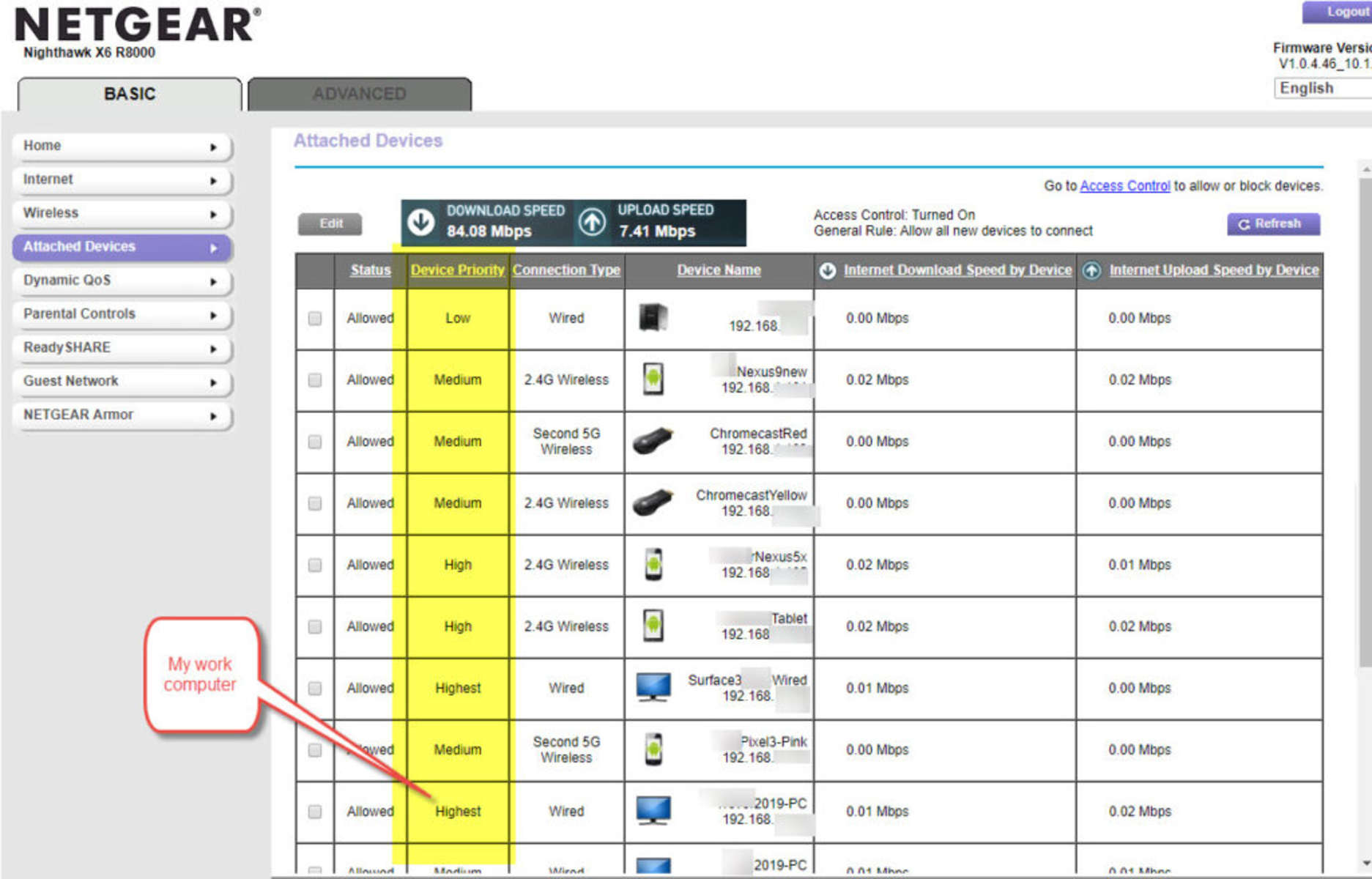
I use QoS at home to ensure my work computer gets priority to the house’s internet connection (the “last mile”). Here’s what it looks like to setup on my home router:


Let’s be honest though, streaming services are not “critical” and will not get QoS priority.  That is, no one is going to die, the economy will not suffer if someone’s television isn’t optimal. So this is the situation that video streaming is in:

Roughly 60% of internet traffic is video streaming which is why the focus is on reducing video quality which will reduce traffic loads.

How can video quality be reduced? Via compression, frames per second (fps) and/or resolution.  How much benefit is there from reducing this? Consider the “Standard Definition” digital equivalent is about 480p resolution. As portrayed in the bandwidth usage charts here,  Netflix bandwidth usage of 480p @ 23.976 fps versus 4K @ 59.940 fps is staggering! ~792 MB per hour vs ~7 GB per hour for a factor of over 7 times (700%)!

The impact may be annoying to some or some people might not even notice. I run all my video services at SD digital equivalent quality even pre-crisis because I don’t care and don’t really notice. I like that the videos load faster when they are smaller. Users may notice more so these differences on larger screens.

Compared to analog television, it doesn’t matter what the streaming services cut, it will still be better!